

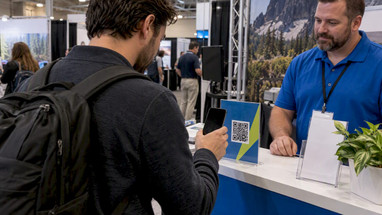
Booth QR Codes for Trade Shows That Turn Scans Into Trackable, Attributable Leads
Posted by Deeder Dandenhorf on Oct 7th 2026
Booth QR Codes for Trade Shows That Turn Scans Into Trackable, Attributable Leads

Point every trade show QR code at a show-specific landing page built for mobile, never your homepage, and tag that link with UTM parameters that match your CRM’s show-source tag exactly. Size and place each code for its context: small for a tabletop tent card, larger for a backwall banner visible across an aisle. Test every scan before doors open, and keep a backup capture method ready in case the hall’s Wi-Fi buckles under thousands of phones.
TL;DR:
- Using show-specific landing pages for QR codes ensures accurate tracking and better lead quality compared to linking to the homepage.
- QR codes placed on backwalls and aisle signs should be at least 5 x 5 centimeters and 6 x 6 centimeters respectively to maximize scan rates.
- Testing QR code contrast, quiet zones, and size from the actual scan distance is crucial to ensure high scan success across devices and lighting conditions.
- Consistent UTM tagging matching your CRM’s show-source field is essential for reliable campaign measurement and post-show reporting.
- Always prepare backup capture methods and test the entire QR-to-CRM workflow before the event to address Wi-Fi issues and technical failures.
Table of Contents
- Where to point QR codes for lead capture that actually converts
- Placement and sizing rules that get codes scanned
- Design rules that keep your code scannable on any phone
- Tracking and measurement: tying scans back to revenue
- Security, scams, and legal guardrails for event QR codes
- Pre-show checklist and backup capture workflow
- How signage choices support reliable QR campaigns
- What exhibitors get wrong about QR codes, and one test to run next
- Make your QR campaign reliable with the right signage
- FAQ
- Sources
Where to point QR codes for lead capture that actually converts
A QR code that lands on your homepage wastes the scan. Visitors land on generic navigation, get distracted, and leave without becoming a lead you can track back to the show. A dedicated landing page built for that specific event lets you measure exactly which placement, which booth, and which campaign produced the scan.
The ExhibitionsVoice exhibitor playbook recommends mobile-first pages that load fast, cap forms at five fields, and carry one clear call to action. Build your page around these rules:
- Keep the form to five fields or fewer so a visitor can finish it standing up.
- Load the page in under three seconds on typical 4G hall connections.
- Show a confirmation screen your rep can glance at and confirm aloud.
- Wire the form to a CRM webhook so the lead lands in your pipeline the moment they submit, using strategies to capture high-intent leads and convert ready-to-buy audiences from Strategic Digital Tech Capture High-Intent Leads and Convert Ready-to-Buy Audiences.
- Add a one-line privacy note and a link to your privacy policy near the form.
A workable UTM pattern looks like utm_source=qr&utm_medium=booth&utm_campaign=expowest2026. The campaign value must match your CRM’s show-source tag character for character, because a mismatched spelling splits your reporting into two buckets you can never fully reconcile. After submission, send visitors to a short thank-you page with one next step: a demo booking link, a downloadable spec sheet, or a promo code redeemable at the booth. Our own breakdown of how trade show displays generate leads that convert walks through how signage and landing pages work together to move a visitor from glance to form.
Placement and sizing rules that get codes scanned
Where you put a code determines whether a visitor’s phone camera can grab it without fumbling. A code on a countertop needs to work at arm’s length. A code on a backwall needs to work from across the aisle.
| Placement | Minimum size | Best use | CTA approach |
|---|---|---|---|
| Counter tent card | 3 x 3 cm | Qualified conversations, rep-guided scans | Rep hands card, explains the offer before the scan |
| Poster or backwall | 5 x 5 cm or larger | Drive-by traffic, unattended scanning | Short headline above the code stating the payoff |
| Literature or business card | 2 x 2 cm | Follow-up after the conversation ends | Label it clearly: “Scan for pricing” or “Scan for the spec sheet” |
| Aisle or sidewalk sign | 6 x 6 cm or larger | Pre-booth intent, walk-by capture | Single word CTA plus a visible incentive |
Counter codes work best when a rep is present to frame the offer before the visitor lifts their phone. Backwall codes need standalone messaging since no one will be there to explain them. Our trade show trend display ideas piece covers spectacle tactics, like oversized props or motion lighting near the code, that pull attention without adding friction to the scan itself.
Design rules that keep your code scannable on any phone
A QR code fails for one of three reasons: poor contrast, a cropped quiet zone, or a logo that breaks too many modules. Fix those three and scan rates hold steady across lighting conditions and phone models.
- Aim for roughly 4:1 contrast between the code and its background, and skip subtle grays that photograph poorly under hall lighting.
- Leave the code’s quiet zone, the blank margin around its edge, untouched: cropping into it breaks the scan.
- Keep branded logos small and centered, and use frames that sit outside the code rather than overlapping its modules.
- Print a proof and scan it with at least three different phone models before approving the full run.
- Test the scan from the actual distance a visitor will stand, not from six inches away at your desk.
Pro Tip: Tape a printed proof to the wall at your office and walk backward until your phone struggles to scan it. That distance tells you your code is too small for its placement.
Tracking and measurement: tying scans back to revenue
A scan without a tag is a number with no story. Build your UTM structure before you print anything, and keep the format identical across every code so your reports stack cleanly at the end of the show.
- Use a consistent pattern:
utm_source=qr,utm_mediumset to the placement (booth, aisle, literature), andutm_campaignmatched exactly to your CRM’s show-source field. - Track scans by placement, not just total scans, so you know whether the backwall or the counter card drove more qualified leads.
- Capture the post-scan journey: did the visitor complete the form, or bounce before finishing.
- Write the show-source tag to the CRM record at the moment of capture, either through a native form integration or a webhook, so nobody has to tag leads manually after the show.
A 2025 Bitly survey of more than 250 marketers found that 93% had increased their QR code usage in the prior year, and 43% used QR codes specifically at events and trade shows to connect physical booth traffic to digital follow-up. Build your reporting checklist around reconciling scans, form completions, and CRM records promptly after the show closing, while the show-source tags are still fresh in everyone’s memory.
Security, scams, and legal guardrails for event QR codes
QR codes carry real fraud risk, and attendees have heard the warnings. The FBI issued an alert in 2025 about unsolicited packages containing QR codes used to initiate fraud schemes, and advised caution before scanning any unfamiliar code.
- Keep codes in supervised, pedestrian contexts rather than unsupervised public displays.
- Avoid driver-facing placements like roadside billboards, as scanning attempts in such contexts may cause safety concerns.
- Post a short line near unattended codes telling visitors to preview the URL before tapping through.
- Include a one-line consent statement on every form and log the consent timestamp in your CRM record.
A 2025 federal alert confirms QR-based fraud schemes are an active risk, which is reason enough to keep your own codes transparent about where they lead and who controls them.
Pre-show checklist and backup capture workflow
Hall Wi-Fi fails more often than anyone plans for, so build a backup into your capture workflow before the show opens rather than improvising on day one.
- Confirm the landing page is live, mobile-tested, and loads correctly on a cellular connection, not just hotel Wi-Fi.
- Test the CRM webhook end to end: submit a real form and confirm the lead appears with the correct show-source tag.
- Print proofs at final size and scan each one from its intended distance before the show.
- Pack charged backup phones and a badge-scanner app in case primary devices or connections fail.
- Brief reps on a short script for offering the scan and reading back the confirmation screen.
- When QR capture fails, fall back to a badge scan, a photo of a business card, or a paper log, then enter those leads into the CRM same-day with the identical show-source tag.
- After the show, dedupe records, audit consent timestamps, and reconcile total scans against leads logged in the CRM.
Pro Tip: Run your full QR-to-CRM test during move-in, not the night before. A failed webhook caught on show-floor Wi-Fi is far easier to fix with a full day ahead of you.
How signage choices support reliable QR campaigns
The right display does more than hold a code in place. It gives that code the stability, scale, and visibility its placement demands.
- The Outdoor Banner Frame - The Banner Bar holds a large-format backwall or poster code steady at the scan distance a drive-by audience needs.
- A 10 ft stretch fabric display gives a branded backwall enough surface area to pair a bold CTA with a code sized for across-the-aisle scanning.
- A Signicade Deluxe A-Frame Sidewalk Sign works well placed ahead of the booth itself, catching intent before a visitor even reaches your table.
Most of our products ship within two business days, which matters when a QR-driven campaign depends on signage arriving proofed, tested, and ready before move-in day.
What exhibitors get wrong about QR codes, and one test to run next

The most common mistakes we see are simple: a code pointed at a homepage, no UTM tag at all, and no backup plan when the Wi-Fi drops. Any one of these turns a scan into a dead end instead of a lead.
Run one experiment at your next show: split your counter cards and backwall codes into two tracked variants, then compare conversion rates by placement once the leads are in. The difference usually tells you where to put your budget for the next event.
— Dan
Make your QR campaign reliable with the right signage
We build the displays that hold your QR codes exactly where visitors can scan them, at the size and distance your placement strategy calls for. Choose the Outdoor Banner Frame - The Banner Bar for a backwall code that needs to read from across the aisle, or the 10 ft stretch fabric display for a branded backdrop built around a clear CTA.
For foot traffic ahead of your booth, the Signicade Deluxe A-Frame Sidewalk Sign catches attention before visitors even reach your table. Many of our products ship quickly, and customers in Arizona have the option for direct delivery to the venue, which can reduce pre-show risk when your QR proofs need last-minute adjustments.
- Browse Printed Banners for literature-size codes and counter cards.
- Check Banner Stands and Quick Ship Displays for fast-turnaround backwall options.
- Explore the full Trade Show Products & Displays range for custom sizing on any placement.
If your next show is close and you need expedited production, reach out through our product pages to check availability and shipping windows.
FAQ
Where can I find QR codes for event registration?
Most event registration platforms generate a QR code automatically once you set up a show-specific landing page or form. For exhibitor booths, build your own code through any QR generator and point it at a dedicated mobile landing page rather than a general registration link, then tag it with UTM parameters for tracking.
What is the FBI warning about QR codes?
The FBI warned in 2025 that unsolicited packages containing QR codes have been used to initiate fraud schemes, and advised caution before scanning any code from an unknown source. The guidance applies broadly to unexpected mail, flyers, or stickers, not just booth signage.
Is it legal to put a QR code on a billboard?
QR codes on billboards are generally legal, but industry commentary cautions against driver-facing placements because they can distract drivers and raise safety and liability concerns. Pedestrian-facing, stationary placements like booth signage or sidewalk signs carry far less risk than roadside billboards.
How do you get a QR code for an event?
Generate one through any QR code tool, point it at a show-specific landing page built for mobile, and tag the URL with UTM parameters that match your CRM’s show-source field. Test the scan at the actual size and distance it will be used before printing it on any signage.
Sources
- QR Code trends and statistics — Bitly
- Unsolicited Packages Containing QR Codes Used to Initiate Fraud Schemes — FBI
- How to use QR codes effectively at your trade show booth — ExhibitionsVoice