

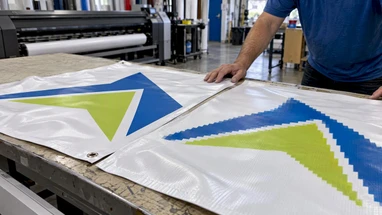
Vector vs. Raster Printing: Which File Type Your Banner Needs
Posted by Deeder Dandenhorf on Oct 26th 2026
Vector vs. Raster Printing: Which File Type Your Banner Needs

Vector artwork is built from mathematical lines and curves, so it prints sharp at any size. Raster artwork is built from pixels, so it prints well only when it has enough of them for the final size. For banners, trade show backdrops and signs, the practical answer is to use both: vector for logos and text, high-resolution raster for photographs. This guide shows you how to tell the two apart, which file formats belong to each, and what to check before you upload your artwork.
TL;DR
- Vector files (AI, EPS, PDF, SVG-style line art) stay crisp at any size. Use them for logos, type, icons and line illustrations.
- Raster files (JPG, TIFF, PSD, PNG) are made of pixels and blur when stretched. Use them for photographs and soft gradients, and size them for the final print.
- Most real banner designs mix both, and that is fine as long as each element is in the right format.
- Required raster resolution depends on how far away people will stand: lower for outdoor banners, higher for trade show graphics seen at arm’s length.
- Convert to CMYK and confirm file specs with your printer before you submit.
Table of Contents
- What is the difference between vector and raster?
- What happens when you enlarge each one
- Which file formats are vector and which are raster
- When to use vector, and when to use raster
- How much resolution a raster image needs
- Our perspective: send vector where you can, and tell us what you have
- A pre-upload checklist for banners and trade show graphics
- Matching file type to the product you are ordering
- Print your banners and displays with us
- FAQ
- Sources
What is the difference between vector and raster?
Vector artwork is digital art composed of mathematical lines and curves, while raster artwork is composed of horizontal and vertical rows of pixels, according to Custom Ink’s artwork guide. That one distinction explains almost everything that follows.
Think of a vector logo as a set of instructions: draw a circle here, a curve there, fill it with this color. The printer’s software can follow those instructions at 2 inches wide or 20 feet wide, and the edges stay clean because the shapes are recalculated each time. A raster image, by contrast, is a fixed grid of colored squares. It has only the information it was saved with. Ask it to cover a bigger area and the software has to guess what goes between the pixels.

A university press artwork guide puts the same idea in print-production terms: vector graphics are resolution-independent and do not use pixels, while the reproduction quality of raster graphics largely depends on resolution.
Neither type is better in general. They are built for different jobs, and the trouble starts only when the wrong one is asked to do the other’s job.
What happens when you enlarge each one
This is where banner buyers feel the difference. A file that looks fine on a laptop can look rough on a 3 x 6 ft vinyl banner or an 8 ft tension fabric wall.
When enlarged for large displays, vector images remain sharp and clear at any size, while raster images become pixelated, blurry or fuzzy, because the file lacks the pixel data to fill the bigger area.
Here is what that looks like on real products:
- A logo saved as a small JPG. The curved edges turn into steps, and thin letters look fuzzy. On a retractable banner, this is the first thing a passerby notices.
- A logo saved as vector. The same logo can sit on a business card and on a pop up tent canopy, and both look clean.
- A photo that is large enough. A good photograph can print beautifully at banner size, because a camera file carries real detail that vector art cannot imitate.
- A website image pulled off a page. These are typically made small for fast loading. They are the most common reason a banner proof looks soft.
A common mistake is to open a small raster file in a design program and scale it up. The file gets bigger on screen, but no new detail is created. If you need a bigger version, go back to the original vector or the original full-size photo.
Which file formats are vector and which are raster
The file extension usually tells you which type you have, with a few exceptions. Typical raster file types include PSD, TIF, JPG, GIF and BMP. Typical vector file types include AI, EPS, PS, INDD, PDF and CDR, per the same Custom Ink guide.
Note that PDF and layered design files can hold either type, or both. A PDF exported from a vector program usually keeps the vector shapes. A PDF made by placing a screenshot inside a document is still a raster picture in a PDF wrapper.
| Format | Usually | Best used for | Watch out for |
|---|---|---|---|
| AI | Vector | Logos, layouts, full banner designs | Outline or embed fonts and link images |
| EPS | Vector | Logos and illustrations | Older format; check that fonts are converted |
| Vector, raster or both | Final print-ready artwork | Quality depends on how it was exported | |
| INDD | Vector layout | Multi-element layouts | Package fonts and images with it |
| CDR | Vector | Logos and signs made in CorelDRAW | Confirm your printer accepts it |
| TIFF | Raster | Photographs and fine detail | Large file size |
| PSD | Raster | Photo-based designs with layers | Flatten or export if asked |
| JPG | Raster | Photos when high quality is saved | Compression loses detail each time it is resaved |
| PNG, GIF, BMP | Raster | Screen graphics | Usually too small and low quality for large prints |
For the final file, HP notes that PDF/X-4 is the industry standard for large-format printing, since it preserves vector sharpness and embeds the fonts and color profiles the job needs. HP also recommends TIFF for photographic and fine art reproduction, because lossless compression means no pixel data is thrown away.
When to use vector, and when to use raster
A simple rule covers most jobs: use vector for logos, line art, typography and technical drawings, and use raster for photography and complex gradients, as HP’s large-format guide lays out. Adobe adds that raster files display more colors and finer shading, and that digital photographs are usually raster.
Logos
Always send the vector version. Your logo will appear on banners, table throws, tents, window lettering and business cards, and it has to look right on all of them. If you only have a JPG of your logo, ask whoever designed it for the original AI, EPS or PDF. If that person is gone, a designer can redraw it as vector, usually a small job compared with the cost of a blurry brand on a 10 ft wall.
Text
Keep headlines and body copy as live vector type, with fonts embedded or converted to outlines. Text that has been flattened into a raster image gets soft edges. Raster formats are also not suited to charts, maps, diagrams or anything with fine lines and small type.
Photographs
Photos are raster, and that is exactly what they should be. What matters is that the photo has enough pixels for the size you are printing. Original camera files or professional images work best; a shot saved from social media rarely does. If you need event or product photography for a booth graphic, a professional shoot such as the commercial photography work from Glenwood Media gives you full-size originals that hold up on large prints.
Illustrations and icons
Flat illustrations, icons and shapes are usually built as vector, along with fonts and company logo files. If an illustration has painterly texture or heavy shading, it may be raster, and then it needs the same resolution care as a photo.
Mixed designs
Most banners combine a vector logo, vector headline and a raster background photo. That is normal. The finished file should keep each layer in its native type rather than flattening everything into one low-resolution picture.
How much resolution a raster image needs
Vector files have no resolution to worry about. Raster files do, and the number depends on how close the viewer stands. HP’s 2026 guide ties resolution to viewing distance: 50-100 PPI for outdoor banners viewed from 20+ ft, 100-150 PPI for posters at 5-10 ft, 150-200 PPI for trade show graphics at 3-5 ft, and 200-300 PPI for close-up displays under 2 ft.
| Where it will hang | Typical viewing distance | Raster resolution at final size |
|---|---|---|
| Outdoor banner or fence wrap | 20+ ft | 50-100 PPI |
| Poster or wall sign | 5-10 ft | 100-150 PPI |
| Trade show backdrop or banner stand | 3-5 ft | 150-200 PPI |
| Table cover, counter graphic, close-up display | Under 2 ft | 200-300 PPI |
The key phrase is “at final size.” A photo that is 3,000 pixels wide gives you 100 PPI on a 30 inch print, but only 25 PPI on a 10 ft wall. Divide the pixel width by the print width in inches to check. If you want to go deeper on large sizes, our own guides on DPI for large banners and banner DPI requirements walk through how far you can stretch a file and where it stops being worth it.
Our perspective: send vector where you can, and tell us what you have
We print banners, banner stands, tension fabric displays and tents for small businesses and exhibitors, many of them working to a show date. The artwork problems we see are rarely exotic. A logo pulled off a website, a photo saved at a fraction of the size needed, text that has not been converted from a font nobody else has.

Our advice is the same every time. Start with your logo in its original vector form and keep it in a folder where you can find it. Treat photographs as raster and choose the largest version you have. Do not try to fix a small file by enlarging it. And do not assume a file is vector because it ends in .pdf.
We also think file quality affects more than looks. Cleaner files mean fewer proof rounds, and fewer rounds mean you get to the show sooner. Our guide on how design files affect print cost for exhibitors covers that side of it. If you are unsure about a file, send it and ask. It is far cheaper to hear “this logo needs a vector version” before printing than after.
— Dan
A pre-upload checklist for banners and trade show graphics
Run through these steps before you send artwork to any printer, including us.
- Find your vector logo. Look for AI, EPS, SVG or a vector PDF. Open it and zoom in to 800 percent: the edges should stay clean.
- Check every photo’s pixel size. Compare it with the print size using the table above. Replace anything that falls short.
- Convert or outline fonts. This prevents font substitution on the printer’s computer.
- Switch to CMYK. For most large-format production, convert to CMYK before submission, unless your print provider asks for RGB for a managed workflow, as HP advises. Bright RGB blues and greens can shift when converted, so check the result on screen first.
- Build at the right size. Use the finished dimensions or a scaled proportion, and add bleed and safe margins if the printer’s template calls for them.
- Export a print-ready PDF. PDF/X-4 is the target for large format. Keep vector elements as vector in the export settings.
- Confirm the specs. Each printer has its own template and accepted formats, so read them before you build.
Our print-ready file checklist goes through the same points in more detail for exhibitors.
Matching file type to the product you are ordering
The product changes how much the file type matters.
- Vinyl and mesh banners. These are often seen from a distance, so raster photos can run at lower resolution, but logos and text should still be vector. Our posts on vinyl banners for trade shows and mesh versus vinyl help with material choice, and the banner material guide covers the rest.
- Retractable banner stands. People read these at 3 to 5 ft, so photos need to be at the higher end of the range and text has to be crisp.
- Tension fabric and backlit displays. Large, close to eye level and often photographic. Use the largest source images you have.
- Table throws and tent canopies. Big flat areas of brand color and logos. Vector is your friend here.
- Window and truck lettering. Cut or printed shapes that depend on clean outlines, so vector is essential.
For help deciding which image style suits which kind of sign, this piece on visual storytelling for brand impact is a handy companion.
Print your banners and displays with us
If your artwork is ready, you can upload it here. Our printed banners start with a standard banner layout at $35, and Next Day Air is available for $10 when time is short. Most of our products ship within two business days, and in Arizona we can deliver directly to your venue. If you are building a booth, browse our trade show products and displays, including banner stands and EZ Tube tension fabric displays.
FAQ
Is a PDF a vector or a raster file?
It can be either. A PDF exported from a design program usually keeps vector shapes and live text, while a PDF made from a photo or screenshot holds raster pixels. Zoom in to a high level to see whether the edges stay sharp.
Can I turn a raster logo into vector?
Yes, by redrawing or tracing it in a vector program. Automatic tracing works on simple, high-contrast logos but often needs cleanup, so a designer’s redraw is the safer route for a brand mark you will use for years.
Can I use a JPG for a banner?
Yes, for photographs, as long as it has enough pixels for the final size and was saved at high quality. For logos and text, use a vector file instead, because small JPGs show soft edges when enlarged.
What resolution do I need for a trade show banner stand?
For graphics viewed from about 3 to 5 ft, HP’s guide suggests 150-200 PPI at the final print size. Outdoor banners seen from far away can use less. Check with your printer for the exact figure on your product.
Should I send RGB or CMYK?
Most large-format printers want CMYK, unless they ask for RGB as part of a managed color workflow. Ask which one applies before you export.
Sources
- Raster Art vs. Vector Art, Custom Ink help center
- Raster vs. vector: What are the differences?, Adobe
- Large Format Printing Best Practices, HP
- Preparing and Submitting Illustrations, university press artwork guide
- Pixels and Paths: Navigating the World of Vector and Raster Files